
Five Line Items in an LLM Budget on a Single GPU - for Assistants, Agents, and Everything in Between
Four line items you can estimate up front - requirements, model class, hardware, people - and the fifth, concurrency, that only a measurement on the real card gives you.
The idea for this piece came from a situation I ran into while costing out my first AI assistant.
Let me start simple. An LLM budget can be calculated. It has five line items: four come from estimates, the fifth can only be measured.
The situation where this question comes up at all looks roughly like this. A company wants an internal assistant - not a chat window over a model, but an agent that goes into the corporate knowledge base and answers from it. Data can’t leave the building: policy, regulator, client contracts, pick your reason. So it’s your own hardware. And the first thing the CFO asks is “what does it cost?”
That’s where it gets strange.
You go to a vendor with a verbal description of the assistant. The vendor answers with a textbook reference architecture: a cluster of one to N nodes, eight or more GPUs each. Because an eight-GPU node is the standard unit of sale, and the vendor has no interest in retailing a valuable GPU resource one card at a time.
Then you turn to calculators and terminal tools like whichllm to estimate the compute yourself. But these tools answer only one question: what fits into a given card’s VRAM and how fast it will run. A lookup table that doesn’t tell you which numbers to look up. And it certainly doesn’t account for the application: how much context a dialog needs, how often a user asks within a session - there are a lot of variables. Which brings you to a chicken-and-egg problem: which model do you pick so that the minimum hardware for it fits your assistant? The loop breaks if you start neither from the model nor from the hardware, but from requirements.
I went through this calculation for a hundred-user installation, and I want to lay it out as a five-part framework for budgeting an assistant on your own hardware. Four parts are estimated up front. The fifth breaks budgets because it requires a real measurement - and that’s the hard part.
1. Requirements: what you’re asking of the model
The question that nags the most at the start is which criteria to pick a model by. The intuitive first move is to find criteria on which models can be compared, and a leaderboard like the Artificial Analysis Agentic Index makes that easy. The trick is knowing which columns matter and which are secondary. So before you open the leaderboard, you need to know what to throw out of it.
The requirements list comes neither from the leaderboard nor from your head, but from how a single dialog with your assistant is built. Suppose one user question in ours unfolds into 1–7 rounds of tool calls, and the context is re-sent on every round. The system is read-only: it retrieves prepared material from the corporate base rather than composing. So input dominates output, and everything you’ve read about token generation speed applies to the smaller half of your workload.
That’s where the filters come from.
-
Function calling is a gate, not a score: the model either calls tools reliably or it’s out of the running.
Aside. The practical exception is models under 10B parameters - the tiny tier (checked on Qwen and Granite as of this writing). The tool-calling capability they advertise works unreliably.
-
Multilingual support is a gate if your users don’t write only in English.
-
Prefix cache matters more than maximum context size, because our context repeats from round to round. The assumption here is that the dialog doesn’t grow without bound toward the window limit, which dialog-compression techniques help with.
And the last number you need before any leaderboard: how many dialogs run at the same time. This one also gets pulled out of thin air - “ten people, easily” - and it’s the one that breaks the budget later. It’s calculated from three things you already have: how many people will use it, how often they ask, and how long a dialog lives. We have a hundred users, requests spread across the workday, dialogs living for minutes - that gives about five concurrent dialogs, not ten and not fifty. And remember that the longer the output in the last answer, the longer the user spends reading it, which adds pacing between requests. From here on this number is a requirement on the card, not a wish.
2. Model class
The second estimate takes a paragraph, though people usually give it a whole article.
On a single card, total parameters decide whether the model fits in VRAM; active parameters decide how fast it runs. We settled on Qwen3.6-35B-A3B: 35 billion total, 3 billion active per token. An MoE model of this class runs faster than a dense model of comparable size - Gemma 4 26B A4B activates about 4 billion of its 25, and that’s noticeably faster than its own dense sibling at 31B. That’s the only thing you need to know about size at this stage.
Clarification. The reason is memory bandwidth. In an MoE model each token reads only the weights of its active experts, not the whole model, and on a single card generation speed is bounded by how many bytes of weights have to be read per token. The RTX Pro 6000 has GDDR7 at about 1.8 TB/s versus ~3.3 TB/s of HBM3 on an H100 - so on a card like this every gigabyte read costs more, and the gap between “3B active” and “27B dense” turns into a multiple in tok/sec. That’s what “active parameters matter on this card” means.
Next, what to measure. Look at agentic tool use (τ²-bench), instruction following (IFEval), and multilingual quality if your users don’t write only in English. Ignore coding (the agent doesn’t write code), math (the model doesn’t count, the server does), knowledge benchmarks like MMLU and GPQA (parametric memory is a risk, not an asset: an answer from memory that bypasses the corporate base is what we call a grounding violation), and Arena ELO (that’s about pleasant chat, not tool discipline).
And the hierarchy of trust that saved me the most time. An independent index narrows the list. The vendor’s model card works as a hypothesis marked self-reported: Qwen3.6’s card states plainly that the authors corrected some tasks in SWE-bench Pro and ran all baselines on the corrected set - and in the next version’s comparison table, their own score on the corrected set sits in the same row as a competitor’s official score on the original. Your own golden set on your own data decides. Benchmarks select candidates; your workload makes the decision.
3. Hardware and how you own it
Once the first two estimates are done, the third turns out to be almost trivial - and at the same time the most perishable.
In spring 2025 an RTX Pro 6000 Blackwell with 96 GB retailed at around $8k; as of September 2026 NVIDIA has raised the list price to $16k and retail sits around $13–15k - same card, same chip. The reason is a GDDR7 shortage. Renting the same card from a neocloud runs $1.3–1.6k a month at 24/7, from AWS about $2.4k. An eight-H100 cluster is around $315k capex or $12k–40k a month depending on who you rent from. There is nothing resembling a continuum between one card and a node: they’re different categories of decision, and if your starting ceiling is a couple of thousand dollars a month, there’s nothing to choose.
What matters more than the prices: a week of rental before the budget is signed costs approximately nothing and answers every question at once. A year in which the card doubled in price without a single change in silicon is the best argument for measuring before you buy, not after. Where the break-even line between owning hardware and using an API falls - that’s a separate piece.
4. People
The line item that appears in no vendor deck.
I’m a believer in boring maintenance with the maximum number of signals - on the card itself and in the dialog usage metrics. Boring here means predictable, and predictable comes from having many signals, set up in advance.
Over four months in production, maintenance came down to two things: keeping the contexts that get loaded into dialogs up to date, and checking the main metrics. That’s the cost of steady state - entry into operation and migrations are counted separately. It should be this simple; if it isn’t, no budget will predict the cost.
5. Concurrency
And now the thing you can’t calculate.
The four items above give you a model, a card, and people. None of them answers a simple question: what does each user get when there are more concurrent dialogs than you planned for? A calculator gives one tok/sec number - for one client. What happens to that number when there are 10 clients? A small lab answers it; the result is in the table.
Three regimes on the same card, same model, same vLLM 0.24.0:
| Regime | Requests in flight | tok/s each | Total tok/s |
|---|---|---|---|
| single dialog | 1 | 77 | 77 |
| ~10 concurrent, default config | ~10 | ~7 | ~70 |
| stress test | 75 | ~1 | ~75 |
The card’s ceiling is a constant. Concurrency doesn’t consume it - it divides it.
What’s happening in the second row? vLLM’s default max-num-seqs=256 doesn’t queue requests; it admits everyone and splits the card between them. 10 clients get 7 tok/sec each instead of 77, answers stretch past the timeout, clients retry. If the retries come without backoff, you get the third row: 75 requests in flight, 79 waiting, 1 tok/sec each. And from the server’s point of view everything is fine - it’s fully loaded and working honestly.
So how do you find the card’s limit - the point up to which a user still gets an answer in acceptable time? A golden set won’t help here: it checks answer quality in sequential runs and knows nothing about parallelism. You need a burst test. Set a goodput threshold of 95% and step down from the theoretical maximum until the threshold stops being breached, then binary-search for the knee. Starting at 12 concurrent is exactly what produced the third row of the table. The knee turned out to be 3. An independent sweep confirmed it: 2 concurrent dialogs with almost no loss (77 vs 68), degradation setting in after 4.
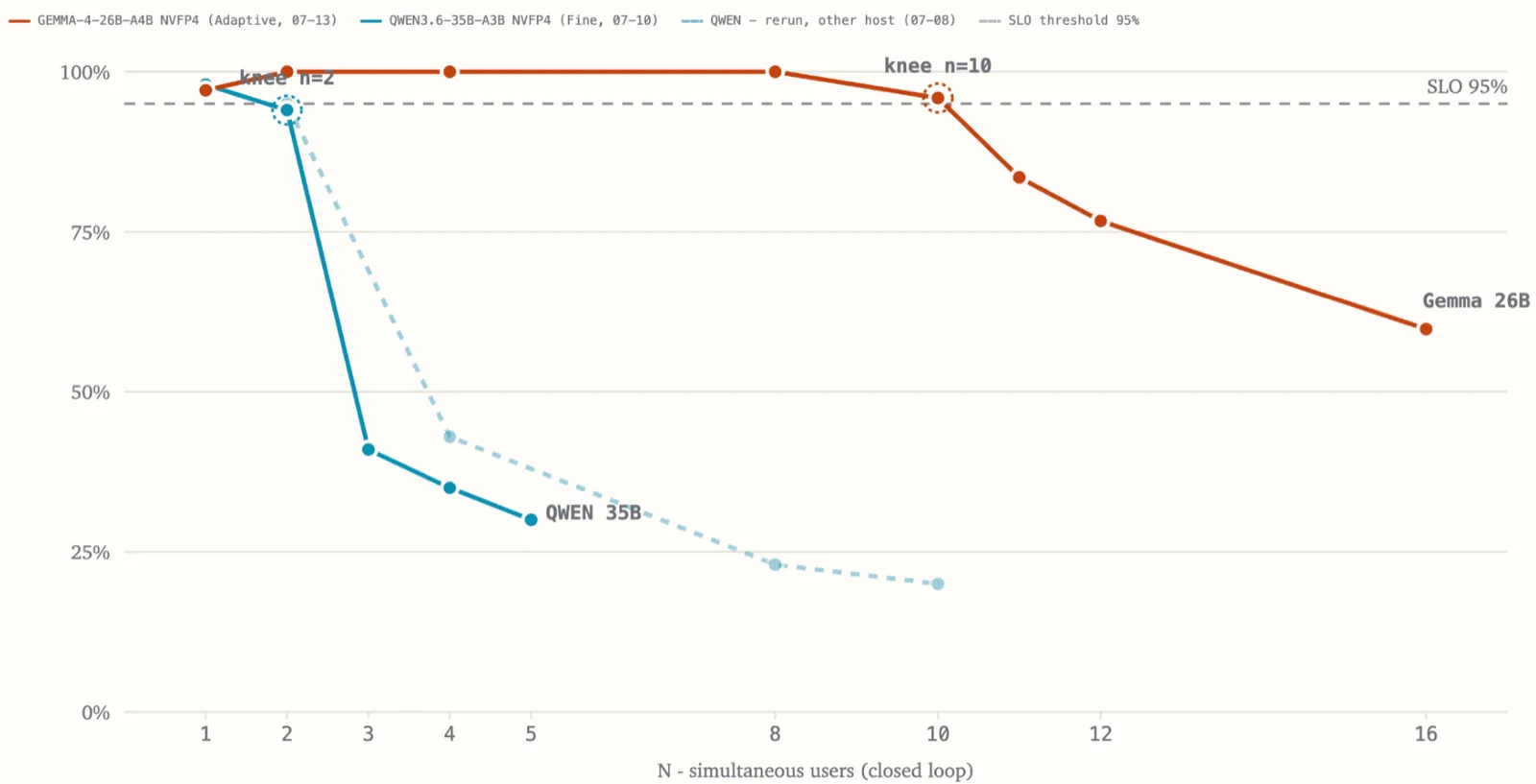
Goodput vs. simultaneous users, closed loop, one RTX Pro 6000. Qwen3.6-35B-A3B (NVFP4) falls below the 95% SLO after 2 concurrent dialogs; Gemma 4 26B A4B (NVFP4) holds until 10. Dashed: the Qwen sweep rerun on another host.
3 concurrent dialogs on a card that, according to the calculator, runs the model with room to spare. That number is the fifth line item of the budget, and no calculation gets you there before the measurement. In the config it lands as max-num-seqs=3.
Aside. On our workload profile the bottleneck is compute, not memory: the KV cache on contexts of a few thousand tokens takes a few percent of VRAM. At 128k context the picture flips - memory dominates - which is exactly why the industry is so taken with hybrid architectures right now. If your dialogs are long, your measurement will give a different knee for a different reason.
Where this breaks
One installation, one card, one stack. A hundred users, about five concurrent dialogs, GPU-bound.
My numbers are my workload profile. These calculations don’t transfer as a recipe with fixed hardware and model names. They’re just variables that change with the case and the conditions. What stays fixed is the order of questions: requirements, then model class, then hardware, then people, and only by measurement - concurrency.
I would decide differently in four cases.
- If adding questions to the golden set starts to consistently degrade answers that already worked - that’s a ceiling of the model class, not the configuration. The next class up may not fit on one card, and that’s an honest reason for a second.
- If the context window of a model that physically fits the card stops being enough - that’s the case where the bottleneck moves from compute to memory, and every measurement above stops being about you.
- If you need zero-downtime deployment. One card is one production; any model or vLLM update is a pause. A second card in this scenario isn’t bought “just in case” but for a specific redundancy: a standby you switch to for the duration of a rollout.
- And the fourth, the most significant and the hardest to argue with: if the burst profile of real traffic consistently pushes goodput below your threshold. Not in a stress test - in production, on the metrics you set up in advance. It’s the only one of the four that’s found by the same measurement described above - which is why you can see it before buying, not after.
And on Monday, one thing is worth doing: rent a card for a week and run your own workload through it before the budget goes for signature. A day of measurement costs less than a purchasing mistake - especially in a year when the purchase doubled in price.
References
- NVIDIA Enterprise Reference Architectures - https://www.nvidia.com/en-us/technologies/enterprise-reference-architecture/
- whichllm - https://github.com/Andyyyy64/whichllm
- Gemma 4 model family overview - https://www.verdent.ai/guides/model/gemma-4
- Qwen3.6-35B-A3B model card - https://huggingface.co/Qwen/Qwen3.6-35B-A3B
- Qwen3.8-27B benchmark provenance breakdown - https://codersera.com/blog/qwen-3-8-27b-complete-guide-2026/
- τ²-bench - https://github.com/sierra-research/tau2-bench
- IFEval - https://arxiv.org/abs/2311.07911
- Artificial Analysis Agentic Index - https://artificialanalysis.ai/models/capabilities/agentic
- RTX Pro 6000 price history, Tom’s Hardware, Aug 12, 2026 - https://www.tomshardware.com/pc-components/gpus/nvidia-doubles-rtx-pro-6000-blackwells-msrp-to-a-staggering-usd16-000-96gb-card-started-pre-orders-below-usd8-000-last-year
- RTX Pro 6000 pricing incl. AWS g7e, Thunder Compute, Sep 2026 - https://www.thundercompute.com/blog/nvidia-rtx-pro-6000-pricing
- RTX Pro 6000 rental, Spheron, Sep 2026 - https://www.spheron.network/gpu-rental/rtx-pro-6000/
- H100 per-hour across providers, Spheron, 2026 - https://www.spheron.network/blog/h100-price-per-hour-2026/
- vLLM SchedulerConfig - https://docs.vllm.ai/en/stable/api/vllm/config/scheduler/
- IBM Granite 4.0 hybrid architecture - https://www.ibm.com/new/announcements/ibm-granite-4-0-hyper-efficient-high-performance-hybrid-models